728x90
반응형

[Spring Boot] Spring Boot에서 Thymeleaf 사용하는 이유와 기본 문법 정리


[Spring Boot] Spring Boot에서 Thymeleaf 사용하는 이유와 기본 문법 정리

[Spring Boot] Spring Boot 프로젝트에 Thymeleaf 템플릿 엔진 적용하기 [Spring Boot] Spring Boot 프로젝트에 Thymeleaf 템플릿 엔진 적용하기[Spring Boot] Spring Boot에서 다중 파일 업로드(Multi File Upload) 구현 가이드 [

crushed-taro.tistory.com

1. Thymeleaf

1. 타임리프의 문법

1. 제어문

종류 문법 설명
if문 th:if="${ONGL을 통한 조건식}" 변수 표현식의 OGNL을 활용한 조건식으로 조건문을 작성하면 결과가 true일 때 해당 태그 범위가 처리된다.
else문 th:unless="${ONGL을 통한 조건식}" 변수 표현식의 OGNL을 활용한 결과가 false일 때 해당 태그 범위가 처리된다.
다중조건처리문 th:if="${ONGL을 통한 조건식 and ONGL을 통한 조건식...}" 변수 표현식의 OGNL을 활용한 조건식들과 and 또는 or를 통해 다중 조건문을 작성하고 결과가 true일 때 해당 태그 범위가 처리된다.
switch문 th:swith="${...}과 th:case="리터럴" th:switch와 th:case를 통해 해당 조건의 값이 어떤 case에 해당되는지에 따라 태그를 선택할 수 있다.
each문 th:each="변수 : ${collection값}" 컬렉션에 해당하는 값들을 하나씩 변수에 담아 collection의 크기만큼 반복하여 태그를 처리한다.


if문 / else문 / 다중조건처리문

// ModelAndView의 Model에 추가
mv.addObject("num", 1);
mv.addObject("str", "바나나");
<p th:if="${ num > 0 }">넘어온 값은 0보다 크다.</p>		<!-- 조건에 해당되면 -->
<p th:if="${ num < 0 }">넘어온 값은 0보다 작다.</p>
<p th:unless="${ num < 0 }">넘어온 값은 0보다 크다.</p>	<!-- 조건에 해당하지 않으면 -->

<th:block th:if="${ str == '사과' }">				<!-- th:block을 사용할 수도 있다. -->
	<p>사과 좋아요!</p>
</th:block>
<th:block th:if="${ str == '바나나' }">
	<p>바나나 좋아요!</p>
</th:block>

<!-- and나 or를 사용해서 다중 조건 처리도 가능하다. -->
<p th:if="${ num > 0 or num <= 10 }">1부터 10까지의 양수</p>
<p th:if="${ str != null and str == '바나나' }">바나나 좋아요!</p>
<!-- #strings라는 타임리프에서 제공하는 Utility Objects에서 제공하는 메소드를 통해서도 null에 대한 처리를 할 수 있다. -->
<p th:if="${ !#strings.isEmpty(str) and str == '바나나' }">바나나 좋아요!</p>


switch문

// ModelAndView의 Model에 추가
mv.addObject("str", "바나나");
<th:block th:switch="${ str }">
	<span th:case="사과">사과가 선택되었습니다</span>
  <span th:case="바나나">바나나가 선택되었습니다</span>
</th:block>


each문

// ModelAndView의 Model에 추가 (name, age, gender, address)
List<MemberDTO> memberList = new ArrayList<>();
memberList.add(new MemberDTO("홍길동", 20, '남', "서울시 서초구"));
memberList.add(new MemberDTO("유관순", 22, '여', "서울시 노원구"));
memberList.add(new MemberDTO("장보고", 40, '남', "서울시 종로구"));
memberList.add(new MemberDTO("신사임당", 30, '여', "서울시 성북구"));

mv.addObject("memberList", memberList);
<table>
	<tr>
		<th>이름</th>
		<th>나이</th>
		<th>성별</th>
		<th>주소</th>
	</tr>
	<tr th:each="member : ${ memberList }">
		<td th:text="${ member.name }"></td>
		<td th:text="${ member.age }"></td>
		<td th:text="${ member.gender }"></td>
		<td th:text="${ member.address }"></td>
	</tr>
</table>
<!-- th:each에 stat을 추가해서 반복상태를 확인할 수 있다. -->
<table>
  <tr>
	  <th>이름</th>
    <th>나이</th>
    <th>성별</th>
    <th>주소</th>
    <th>INDEX</th>
    <th>COUNT</th>
    <th>SIZE</th>
    <th>CURRENT</th>
    <th>EVEN</th>
    <th>ODD</th>
    <th>FIRST</th>
    <th>LAST</th>
  </tr>
  <tr th:each="member, stat : ${ memberList }">
    <td th:text="${ member.name }"></td>
    <td th:text="${ member.age }"></td>
    <td th:text="${ member.gender }"></td>
    <td th:text="${ member.address }"></td>
    <td th:text="${ stat.index }"></td>
    <td th:text="${ stat.count }"></td>
    <td th:text="${ stat.size }"></td>
    <td th:text="${ stat.current }"></td>
    <td th:text="${ stat.even }"></td>
    <td th:text="${ stat.odd }"></td>
    <td th:text="${ stat.first }"></td>
    <td th:text="${ stat.last }"></td>
  </tr>
</table>
<!-- th:each에 stat을 추가하지 않으면 '변수명+Stat'으로 반복상태를 확인할 수 있다. -->
<table>
  <tr>
	  <th>이름</th>
    <th>나이</th>
    <th>성별</th>
    <th>주소</th>
    <th>INDEX</th>
    <th>COUNT</th>
    <th>SIZE</th>
    <th>CURRENT</th>
    <th>EVEN</th>
    <th>ODD</th>
    <th>FIRST</th>
    <th>LAST</th>
  </tr>
  <tr th:each="member: ${ memberList }">
    <td th:text="${ member.name }"></td>
    <td th:text="${ member.age }"></td>
    <td th:text="${ member.gender }"></td>
    <td th:text="${ member.address }"></td>
    <td th:text="${ memberStat.index }"></td>
    <td th:text="${ memberStat.count }"></td>
    <td th:text="${ memberStat.size }"></td>
    <td th:text="${ memberStat.current }"></td>
    <td th:text="${ memberStat.even }"></td>
    <td th:text="${ memberStat.odd }"></td>
    <td th:text="${ memberStat.first }"></td>
    <td th:text="${ memberStat.last }"></td>
  </tr>
</table>


2. SpringEL

  • 변수 표현식(${...})에서 SpringEL을 사용하여 단순한 변수가 아닌 Object, List, Map같은 객체의 값들을 불러올 수 있다.
종류 문법 설명
Object ${객체명.속성명} 해당 객체의 속성값을 불러온다.
  ${객체명['속성명']}  
  ${객체명.속성의 getter()}  
List ${List객체명[index번째 객체].속성명} List에서 index번째 객체의 속성을 불러온다.
  ${List객체명[index번째 객체]['속성명']}  
  ${List객체명[index번째 객체].속성의 getter()}  
  ${List객체명.get(index번째 객체).속성의 getter()}  
  ${List객체명.get(index번째 객체).속성명}  
Map ${Map객체명['객체의 키값']['속성명']} Map에서 키값에 해당하는 객체의 속성을 불러온다.
  ${Map객체명['객체의 키값']['속성명']}  
  ${Map객체명['객체의 키값'].속성의 getter()}


// ModelAndView의 Model에 추가 (name, age, gender, address)
MemberDTO member = new MemberDTO("홍길동", 20, '남', "서울시 서초구");

mv.addObject("member", member);

List<MemberDTO> memberList = new ArrayList<>();
memberList.add(new MemberDTO("홍길동", 20, '남', "서울시 서초구"));
memberList.add(new MemberDTO("유관순", 22, '여', "서울시 노원구"));
memberList.add(new MemberDTO("장보고", 40, '남', "서울시 종로구"));
memberList.add(new MemberDTO("신사임당", 30, '여', "서울시 성북구"));

mv.addObject("memberList", memberList);

Map<String, MemberDTO> memberMap = new HashMap<>();
memberMap.put("m01", new MemberDTO("홍길동", 20, '남', "서울시 서초구"));
memberMap.put("m02", new MemberDTO("유관순", 22, '여', "서울시 노원구"));
memberMap.put("m03", new MemberDTO("장보고", 40, '남', "서울시 종로구"));
memberMap.put("m04", new MemberDTO("신사임당", 30, '여', "서울시 성북구"));

mv.addObject("memberMap", memberMap);
<p>Object</p>
<ul>
	<li th:text="${ member.name }"></li>
	<li th:text="${ member['age'] }"></li>
		<!-- 위 두가지 방식은 getter가 필요 없지만 getGender()는 반드시 해당 클래스에 getter가 있어야 한다. -->
	<li th:text="${ member.getGender() }"></li>
</ul>
<p>List</p>
<ul>
	<li th:text="${ memberList[1].name }"></li>
	<li th:text="${ memberList[1]['age'] }"></li>
	<!-- 위 두가지 방식은 getter가 필요 없지만 getGender()는 반드시 해당 클래스에 getter가 있어야 한다. -->
	<li th:text="${ memberList[1].getGender() }"></li>
	<li th:text="${ memberList.get(1).getGender() }"></li>
	<li th:text="${ memberList.get(1).address }"></li>
</ul>
<p>Map</p>
<ul>
	<li th:text="${ memberMap['m03'].name }"></li>
	<li th:text="${ memberMap['m03']['age'] }"></li>
	<!-- 위 두가지 방식은 getter가 필요 없지만 getGender()는 반드시 해당 클래스에 getter가 있어야 한다. -->
	<li th:text="${ memberMap['m03'].getGender() }"></li>	
</ul>


3. 기타

종류 문법 설명
타임리프 네임스키마 xmlns:th="http://www.thymeleaf.org" 타임리프를 활용하기 위해서는 html의 html태그에 네임스키마로 선언해 주어야 한다.
escape 적용 th:text="${...}" 변수 표현식의 값을 불러오지만 escape가 적용되어 태그를 단순 문자열로 처리하고 html에 표현한다.
escape 미적용 th:utext="${...}" 변수 표현식의 값을 불러오지만 escape가 적용되지 않아 태그를 태그로써 인식하게 처리하고 html에 표현한다.
value 속성 적용 th:value="${...}" 변수 표현식의 값을 불러와 태그의 value값을 지정한다.
리터럴 치환
th:text=”|리터럴${…}리터럴|”
‘| ‘를 양 옆에 사용하면 ‘+’를 쓰지 않고 문자열 합치기를 할 수 있다.
블럭태그 th:block 범위를 지정하고 싶을 때 사용한다.
th:block을 통해 해당 범위에 변수나 객체를 적용하거나 조건에 해당되는지에 따라 해당 범위를 보여주거나 보여주지 않을 때 사용할 수 있다.
지역변수 th:with="변수명1 = ${...}, 변수명2 =${...}, ..." 변수 표현식(${...})을 통해 불러온 값을 해당하는 변수명으로 해당 태그 범위의 지역변수가 되게 한다.
security 인증 정보 여부 sec:authorize="isAuthenticated()” 타임리프에서 시큐리티 적용 시 로그인, 로그아웃에 대한 이벤트를 줄 수 있다.


타임리프 네임스키마

<html xmlns:th="http://www.thymeleaf.org">


escape 적용/미적용, value 속성 적용

태그의 값을 태그 내부의 값으로 작성하기 위해서는 th:text 또는 th:utext를 사용할 수 있다. th:text는 escape가 적용되어 태그를 단순 문자열로 처리하지만 th:utext는 escape가 적용되지 않아 태그를 태그로써 인식할 수 있다. (DB에 태그가 포함된 문자열을 저장했을 시 유용

th:value는 태그의 value값을 지정할 수 있다.

// ModelAndView의 Model에 추가
mv.addObject("hello", "hello!<h3>Thymeleaf</h3>");
<ul>
	<li th:text="${ hello }"></li>
	<li th:utext="${ hello }"></li>
	<li><input type="text" th:value="타임리프"></li>
</ul>


리터럴 치환

// ModelAndView의 Model에 추가 (name, age, gender, address)
mv.addObject("member", new MemberDTO("홍길동", 20, '남', "서울시 서초구"));
<p th:object="${ member }" th:text="|name = '*{ name }'|"></p>
<p th:object="${ member }" th:text="|age = '*{ age }'|"></p>
<p th:object="${ member }" th:text="|gender = '*{ gender }'|"></p>
<p th:object="${ member }" th:text="|address = '*{ address }'|"></p>


블럭 태그

// ModelAndView의 Model에 추가 (name, age, gender, address)
mv.addObject("member", new MemberDTO("홍길동", 20, '남', "서울시 서초구"));
<th:block th:object="${ member }" >
	<p th:text="*{ age }"></p>
</th:block>


지역 변수

// ModelAndView의 Model에 추가 (startPage, endPage, pageNo)
SelectCriteria selectCriteria = new SelectCriteria(1, 10, 3);
mv.addObject(selectCriteria);
<th:block th:with="start = ${ selectCriteria.startPage }, last = ${ selectCriteria.endPage }">
  <th:block th:each="p : ${ #numbers.sequence(start, last) }">
    <th:block th:if="${ selectCriteria.pageNo eq p }">
        <button th:text="${ p }" disabled></button>
    </th:block>
    <th:block th:if="${ selectCriteria.pageNo ne p }">
        <button th:text="${ p }"></button>
    </th:block>
  </th:block>
</th:block>


728x90
반응형
728x90
반응형

[Spring Boot] Spring Boot 프로젝트에 Thymeleaf 템플릿 엔진 적용하기


[Spring Boot] Spring Boot 프로젝트에 Thymeleaf 템플릿 엔진 적용하기

[Spring Boot] Spring Boot에서 다중 파일 업로드(Multi File Upload) 구현 가이드 [Spring Boot] Spring Boot에서 다중 파일 업로드(Multi File Upload) 구현 가이드[Spring Boot] Spring Boot File Upload 예제 | 이미지 및 파일 업

crushed-taro.tistory.com

1. Thymeleaf

1. 타임리프의 사용 이유

1. 타임리프의 장점

  • Natural Templates를 제공한다.(HTML의 기본 구조를 그대로 사용할 수 있으며 HTML파일을 직접 열어도 동작한다.)
  • [Natural Templates]: 기존 HTML의 마크업 언어를 사용한 디자인 구조로 되어 있는 템플릿으로 서버를 구동하지 않으면 순수 HTML을, 서버를 구동하면 동적으로 HTML이 생성된다. 즉, 순수 HTML을 그대로 유지하면서 뷰 템플릿도 사용할 수 있는 특징이 있다.
  • 개발 시 디자인과 개발이 분리되어 작업 효율이 좋다.
  • WAS를 통하지 않고도 파일을 웹 브라우저를 통해 열 수 있어 퍼블리셔와 협업이 용이하다.

2. 타임리프의 단점

  • jsp태그 라이브러리와 custom태그들을 사용할 수 없어 기존 JSP코드를 재사용할 수 없다.
  • 기존 태그를 유지하고 속성으로 템플릿 구문을 넣는데 있어 어느정도 한계가 있고 자바스크립트나 jQuery의 도움이 필요할 수 있다.

2. 타임리프의 문법

1. 주석

종류 문법 설명
parser-level 주석 <!--/* 주석내용 */--> parser-level 주석은 정적인 페이지에서는 주석으로 있다가 thymeleaf가 처리될 때 제거되어 클라이언트에게 노출되지 않는다는 장점이 있다.
prototype-only 주석 <!--/*/ 주석내용 /*/--> prototype-only 주석은 정적 페이지에서 주석으로 있다가 thymeleaf 처리 후에는 화면에 보여지게 되는 주석
<ul>
  <li>parser-level 주석</li>
  <!--/* 주석내용 */-->
  <li>prototype-only 주석</li>
  <!--/*/ 주석내용 /*/-->
</ul>


2. 표현식

종류 문법 설명
변수 표현식 ${...} parameter, session, model 등에 저장되어 있는 변수의 값들을 문자열로 변환하여 불러온다.
메시지 표현식 #{...} message source로부터 키에 해당하는 메시지를 가져온다.
링크 표현식 @{...} th:href, th:src, th:action 등과 같이 URL이 지정되는 속성에 사용한다.
선택 변수 표현식 *{...} 부모 태그의 th:object에 지정된 객체를 기준으로 해당 객체의 속성에 접근한다.
인라인 표현식 [[...]], [(...)] 텍스트 모드나 자바스크립트 모드로 내부에 선언한 변수 표현식의 값을 가져와서 html에 직접 표시한다.


변수 표현식

<button onclick="location.href='/lecture/expression?title=표현식&no=5&no=6'">
	표현식
</button>

<p th:text="${ param.title }"></p>
<p th:text="${ param.no[0] }"></p>
<p th:text="${ param.no[1] }"></p>
<!-- 파라미터가 존재하지 않으면 무시하지 않고 에러 발생함 -->
<!--<p th:text="${ param.no[2] }"></p>-->
  • parameter ⇒ param
  • session attribute ⇒ session
  • request attribute ⇒ 따로 작성하지 않는다.

메세지 표현식

# resources/messages.properties
message.value=hello world

<p th:text="#{ message.value }"></p>


링크 표현식

<a th:href="@{/}">메인으로</a>


선택 변수 표현식

// ModelAndView의 Model에 추가 (name, age, gender, address)
mv.addObject("member", new MemberDTO("홍길동", 20, '남', "서울시 서초구"));
<p th:text="${ member.name }"></p>
<p th:object="${ member }" th:text="*{ age }"></p>
<p th:object="${ member }" th:text="*{ gender }"></p>
<div th:object="${ member }" >
	<p th:text="*{ address }"></p>
</div>


인라인 표현식

// ModelAndView의 Model에 추가
mv.addObject("hello", "hello!<h3>Thymeleaf</h3>");

<p th:inline="none">
	변수 표현식의 값을 html에 직접 표시하기 위해서 th:text와 같은 [[...]]를 사용하고 
	th:utext와 같은 [(...)]를 사용할 수 있다.
	대괄호로 묶어 이와 같이 변수 표현식의 값을 가져오는 것을 인라인 모드라고 하며 
	인라인 모드는 text모드와 자바스크립트 모드가 있다.
	우리는 변수 표현식의 값을 자바스크립트에서 쓰는 것이 아닌 html에서 사용하려는 것이므로
	th:inline="text"를 태그에 속성값으로 주고 써야 하지만 
	th:inline="text"를 쓰지 않아도 적용된다.

	반면 인라인 모드를 적용하지 않으려면 th:inline="none"을 속성값으로 주면 변수 표현식의 값이
	인라인모드로 사용하지 않아([[]] 또는 [()]를 인식하지 않음) 단순 문자열로 처리할 수 있다.

	자바스크립트에서 사용하려면 th:inline="javascript"를 태그에 속성값으로 주고 써야 하지만
	역시나 th:inline="javascript"를 쓰지 않아도 적용된다.
<p>
<ul>
	<li th:inline="text">[[${ hello }]]</li>
	<li>[(${ hello })]</li>
	<li th:inline="none">[[${ hello }]]</li>
	<li th:inline="none">[(${ hello })]</li>
</ul>
<script th:inline="javascript">

	window.onload = function(){

		/* 정적 페이지에서는 자바스크립트 문법 오류가 난다. (리터럴 형태가 아니기 때문)
		 * 하지만 동적 페이지에서는 정상 동작한다. ""로 감싸서 던진다.
	   * */
	  // let hello = [[${hello}]];

	  /* 정적 페이지에서는 자바스크립트 문법 오류가 발생하지 않는다. (문자열 리터럴 형태이기 때문)
	   * 하지만 동적 페이지에서는 에러 발생한다. ""로 감싸기 때문에 ""[[${ hello }]]""가 된다.
	   * */
	  // let hello = "[[${ hello }]]";

	  /* 정적 페이지와 동적 페이지 모두 문제가 생기지는 않는다. */
	  let hello = '[[${ hello }]]';

	  alert(hello);
  }
</script>
728x90
반응형
728x90
반응형

[Spring Boot] Spring Boot에서 다중 파일 업로드(Multi File Upload) 구현 가이드


[Spring Boot] Spring Boot에서 다중 파일 업로드(Multi File Upload) 구현 가이드

[Spring Boot] Spring Boot File Upload 예제 | 이미지 및 파일 업로드 구현 가이드 [Spring Boot] Spring Boot File Upload 예제 | 이미지 및 파일 업로드 구현 가이드[Spring Boot] Spring Boot에서 Interceptor 사용하기 | 설정

crushed-taro.tistory.com

1. 타임리프(Thymeleaf) 개요

1. 타임리프란?

  • 타임리프는 스프링 부트에서 공식적으로 지원하는 View 템플릿이다.

Spring Boot 사진 1

Thymeleaf는 웹 및 독립 실행형 환경 모두를 위한 최신 서버 측 Java 템플릿 엔진입니다.
Thymeleaf의 주요 목표는 귀하의 개발 워크플로에 우아하고 자연스러운 템플릿을 가져오는 것입니다.
HTML은 브라우저에 올바르게 표시될 수 있고 정적 프로토타입으로도 작동하여 개발 팀에서 보다 강력한 협업을 가능하게 합니다.
Spring Framework용 모듈, 선호하는 도구와의 통합 호스트 및 고유한 기능을 플러그인할 수 있는 기능을 갖춘 Thymeleaf는 할 수 있는 것이 훨씬 더 많지만 현대 HTML5 JVM 웹 개발에 이상적입니다.
출처 : https://www.thymeleaf.org/
 

Thymeleaf

Integrations galore Eclipse, IntelliJ IDEA, Spring, Play, even the up-and-coming Model-View-Controller API for Java EE 8. Write Thymeleaf in your favourite tools, using your favourite web-development framework. Check out our Ecosystem to see more integrati

www.thymeleaf.org


2. 타임리프의 특징

  • JSP와 달리 Thymeleaf 문서는 html 확장자를 갖고 있어 JSP처럼 Servlet이 문서를 표현하는 방식이 아니기 때문에 서버 없이도 동작 가능하다.
  • SSR 템플릿으로 백엔드에서 HTML을 동적으로 생성한다.
  • 타임리프는 스프링 부트에서 사용할 것을 권장하고 있고 스프링부트에서 JSP는 별도의 설정이 필요한 반면 타임리프는 바로 적용이 될만큼 스프링과 자연스럽게 통합할 수 있다.
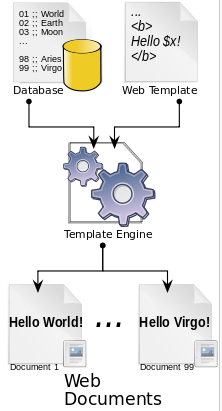
  • [템플릿 엔진]: 데이터와 이 데이터들을 표현 할 템플릿을 결합해주는 도구로 스프링 부트가 지원하는 템플릿 엔진은 Thymeleaf, Freemarker, Mustache, Groovy가 있다.

출처 : https://en.wikipedia.org/wiki/Web_template_system


Web template system - Wikipedia

From Wikipedia, the free encyclopedia System in web publishing The basic process for a server-side web templating system: content (from a database), and "presentation specifications" (in a web template), are combined (through the template engine) to mass-p

en.wikipedia.org

Spring Boot 사진 2

728x90
반응형
728x90
반응형

[Spring Boot] Spring Boot File Upload 예제 | 이미지 및 파일 업로드 구현 가이드


[Spring Boot] Spring Boot File Upload 예제 | 이미지 및 파일 업로드 구현 가이드

[Spring Boot] Spring Boot에서 Interceptor 사용하기 | 설정부터 실전 예제까지 [Spring Boot] Spring Boot에서 Interceptor 사용하기 | 설정부터 실전 예제까지[Spring Boot] Spring Boot 에러 처리: @ControllerAdvice로 쉽게 관

crushed-taro.tistory.com

1. MultiFile Upload

1. 파일 업로드 뷰 페이지 작성

업로드 폼을 보여줄 뷰 페이지를 작성한다.

<form action="multi-file" method="post" encType="multipart/form-data">
  파일 : <input type="file" name="multiFiles" multiple><br>
  파일 설명 : <input type="text" name="multiFileDescription"><br>
  <input type="submit">
</form>


위 코드에서 input 태그의 multiple은 파일 여러 개를 한 번에 업로드 하기 위한 속성이다.


2. 파일 업로드를 처리할 컨트롤러 생성

업로드 파일이 같은 name 속성으로 여러 개 전달 되므로 MultipartFile클래스는 List타입으로 선언해야 한다.

@PostMapping("multi-file")
	public String multiFileUpload(@RequestParam List<MultipartFile> multiFiles, 
			String multiFileDescription, Model model) {

		System.out.println("multiFiles : " + multiFiles);
		System.out.println("multiFileDescription : " + multiFileDescription);
		
		/* 파일을 저장할 경로 설정 */
		String root = "src/main/resources/static";
		
		System.out.println("root : " + root);
		
		String filePath = root + "/uploadFiles";
		
		File dir = new File(filePath);
		if(!dir.exists()) {
			dir.mkdirs();
		}

		List<FileDTO> files = new ArrayList<>();
		
		try {
			for(MultipartFile file : multiFiles) {
				/* 파일명 변경 처리 */
				String originFileName = file.getOriginalFilename();
				String ext = originFileName.substring(originFileName.lastIndexOf("."));
				String savedName = UUID.randomUUID().toString().replace("-", "") + ext;

				/* 파일에 관한 정보 추출 후 보관 */
				files.add(new FileDTO(originFileName, savedName, filePath, 
					multiFileDescription));
				/* 파일을 저장 */
				file.transferTo(new File(filePath + "/" + savedName));
			}
			model.addAttribute("message", "파일 업로드 성공!");
		} catch (Exception e) {
			e.printStackTrace();
			
			/* 실패 시 이전에 저장 된 파일 삭제 */
			for(FileDTO file : files) {
				new File(filePath + "/" + file.getSavedName()).delete();
			}

			model.addAttribute("message", "파일 업로드 실패!!");
		} 
		
		return "result";
	}


@RequestParam어노테이션을 이용하여 요청 파라미터 중 multiFiles라는 이름으로 전송된 파일을 List<MultipartFile>객체로 받아온다. 이후 해당 파일을 처리하는데 필요한 정보를 DTO 타입을 선언해서 다룰 수 있다. 추후 DB에 저장하는 등의 작업이 필요하다. 실패 시 이전에 저장 된 파일은 삭제하며 최종적으로 result라는 뷰 페이지를 반환한다.


3. FileDTO

파일을 처리하는데 필요한 정보를 DTO 타입을 선언해서 다룰 수 있다. 추후 DB에 저장하는 등의 작업 시 활용 된다.


public class FileDTO {

    private String originFileName;
    private String savedName;
    private String filePath;
    private String fileDescription;

    public FileDTO() {
    }

    public FileDTO(String originFileName, String savedName, String filePath,
				  String fileDescription) {
        this.originFileName = originFileName;
        this.savedName = savedName;
        this.filePath = filePath;
        this.fileDescription = fileDescription;
    }

    public String getOriginFileName() {
        return originFileName;
    }

    public void setOriginFileName(String originFileName) {
        this.originFileName = originFileName;
    }

    public String getSavedName() {
        return savedName;
    }

    public void setSavedName(String savedName) {
        this.savedName = savedName;
    }

    public String getFilePath() {
        return filePath;
    }

    public void setFilePath(String filePath) {
        this.filePath = filePath;
    }

    public String getFileDescription() {
        return fileDescription;
    }

    public void setFileDescription(String fileDescription) {
        this.fileDescription = fileDescription;
    }

    @Override
    public String toString() {
        return "FileDTO{" +
                "originFileName='" + originFileName + '\'' +
                ", savedName='" + savedName + '\'' +
                ", filePath='" + filePath + '\'' +
                ", fileDescription='" + fileDescription + '\'' +
                '}';
    }

}


4. 반환 뷰 페이지

이전 테스트와 동일한 반환 뷰 페이지를 사용한다.


<!doctype html>
<html lang="en">
<head>
    <meta charset="UTF-8">
    <title>result</title>
</head>
<body>
    <h1 th:text="${ message }"></h1>
</body>
</html>


지정된 경로에 파일이 업로드 되는 것을 확인할 수 있다.

728x90
반응형
728x90
반응형

[Spring Boot] Spring Boot에서 Interceptor 사용하기 | 설정부터 실전 예제까지


[Spring Boot] Spring Boot에서 Interceptor 사용하기 | 설정부터 실전 예제까지

[Spring Boot] Spring Boot 에러 처리: @ControllerAdvice로 쉽게 관리하기 [Spring Boot] Spring Boot 에러 처리: @ControllerAdvice로 쉽게 관리하기[Spring Boot] Spring Boot 에러 처리: @ExceptionHandler로 쉽게 관리하기 [Spring Boo

crushed-taro.tistory.com

1. Single File Upload

1. application.properties

spring-boot-starter-web에는 file upload를 위한 multipartResolver 가 기본 빈으로 등록 되어 있기 때문에 추가적으로 등록할 필요는 없다. 파일 저장 경로, 용량 등에 대한 설정을 application.properties를 이용해서 할 수 있다.


파일의 크기가 fize-size-threshold 값 이하라면 임시파일을 생성하지 않고 메모리에서 즉시 파일을 읽어서 생성할 수 있다. 속도는 빠르지만 쓰레드가 작업을 수행하는 동안 부담이 될 수 있다.


파일의 크기가 fize-size-threshold 값을 초과한다면 파일은 spring.servlet.multipart.location 경로에 저장되어 해당 파일을 읽어서 작업을 하도록 되어있다. 이 예제에서는 프로젝트 내부 경로에 업로드 파일을 저장하려고 하니 프로젝트 절대 경로를 파일 저장 경로로 설정한다.


# 파일 저장 경로
spring.servlet.multipart.location=프로젝트절대경로

# 최대 업로드 파일 크기
spring.servlet.multipart.max-file-size=10MB

# 최대 요청 파일 크기
spring.servlet.multipart.max-request-size=10MB


2. 파일 업로드 뷰 페이지 작성

업로드 폼을 보여줄 뷰 페이지를 작성한다. 


<form action="single-file" method="post" encType="multipart/form-data">
	파일 : <input type="file" name="singleFile"><br>
  파일 설명 : <input type="text" name="singleFileDescription"><br>
  <input type="submit">
</form>


위 코드에서 enctype="multipart/form-data"는 파일 업로드를 위한 인코딩 타입을 지정하는 속성이다.


3. 파일 업로드를 처리할 컨트롤러 생성


Spring Framework에서는 MultipartFile클래스를 이용하여 파일 업로드를 처리한다. 이를 처리할 컨트롤러를 생성한다.


@PostMapping("single-file")
public String singleFileUpload(@RequestParam MultipartFile singleFile, 
		String singleFileDescription, Model model) {
		
		System.out.println("singleFile : " + singleFile);
		System.out.println("singleFileDescription : " + singleFileDescription);
		
		/* 파일을 저장할 경로 설정 */
		String root = "src/main/resources/static";
		String filePath = root + "/uploadFiles";
		
		File dir = new File(filePath);
		System.out.println(dir.getAbsolutePath());

		if(!dir.exists()) {
			dir.mkdirs();
		}
		
		/* 파일명 변경 처리 */
		String originFileName = singleFile.getOriginalFilename();
		String ext = originFileName.substring(originFileName.lastIndexOf("."));
		String savedName = UUID.randomUUID().toString().replace("-", "") + ext;
		
		/* 파일을 저장 */
		try {
			singleFile.transferTo(new File(filePath + "/" + savedName));
			model.addAttribute("message", "파일 업로드 성공!");
		} catch (Exception e) {
			e.printStackTrace();
			model.addAttribute("message", "파일 업로드 실패!!");
		} 
		
		return "result";
	}


@RequestParam어노테이션을 이용하여 요청 파라미터 중 singleFile이라는 이름으로 전송된 파일을 MultipartFile객체로 받아온다. 이후 해당 파일을 리네임 처리하여 저장하고, result라는 뷰 페이지를 반환한다.


4. 반환 뷰 페이지 작성

<!doctype html>
<html lang="en">
<head>
    <meta charset="UTF-8">
    <title>result</title>
</head>
<body>
    <h1 th:text="${ message }"></h1>
</body>
</html>


지정된 경로에 파일이 업로드 되는 것을 확인할 수 있다.

728x90
반응형
728x90
반응형

[Spring Boot] Spring Boot 에러 처리: @ControllerAdvice로 쉽게 관리하기


[Spring Boot] Spring Boot 에러 처리: @ControllerAdvice로 쉽게 관리하기

[Spring Boot] Spring Boot 에러 처리: @ExceptionHandler로 쉽게 관리하기 [Spring Boot] Spring Boot 에러 처리: @ExceptionHandler로 쉽게 관리하기[Spring Boot] Spring Boot Controller에서 ModelAndView 반환과 동작 원리 [Spring Boot]

crushed-taro.tistory.com

1. Interceptor

1. Spring Interceptor란?

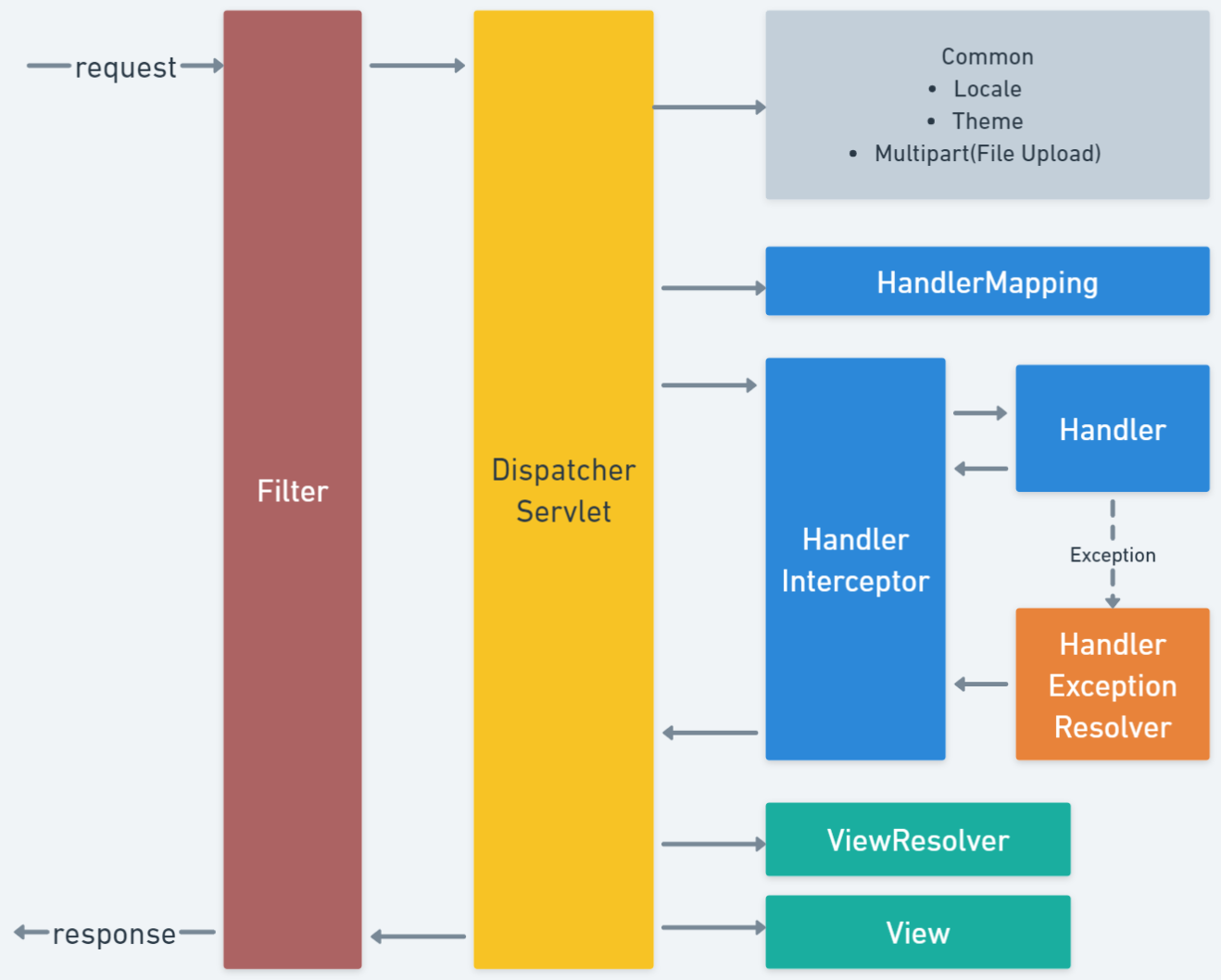
Spring Interceptor는 Spring 프레임워크에서 제공하는 기능 중 하나로, 클라이언트의 요청을 가로채서 처리하는 역할을 한다. 이를 통해 공통적인 로직(로깅, 성능 측정, 캐싱)을 처리하거나, 보안(인증, 권한) 등의 목적으로 특정 조건을 검사하고 해당 요청을 처리하거나, 무시할 수 있다.


Interceptor는 특정 요청 URL에만 적용되도록 매핑할 수 있다는 점이 필터와 유사하다. 하지만 필터와 달리 
Interceptor는 스프링 웹 애플리케이션 컨텍스트에 구성하기 때문에 컨테이너의 기능을 자유롭게 활용할 수 있으며 그 내부에 선언된 모든 빈을 참조할 수 있다. 


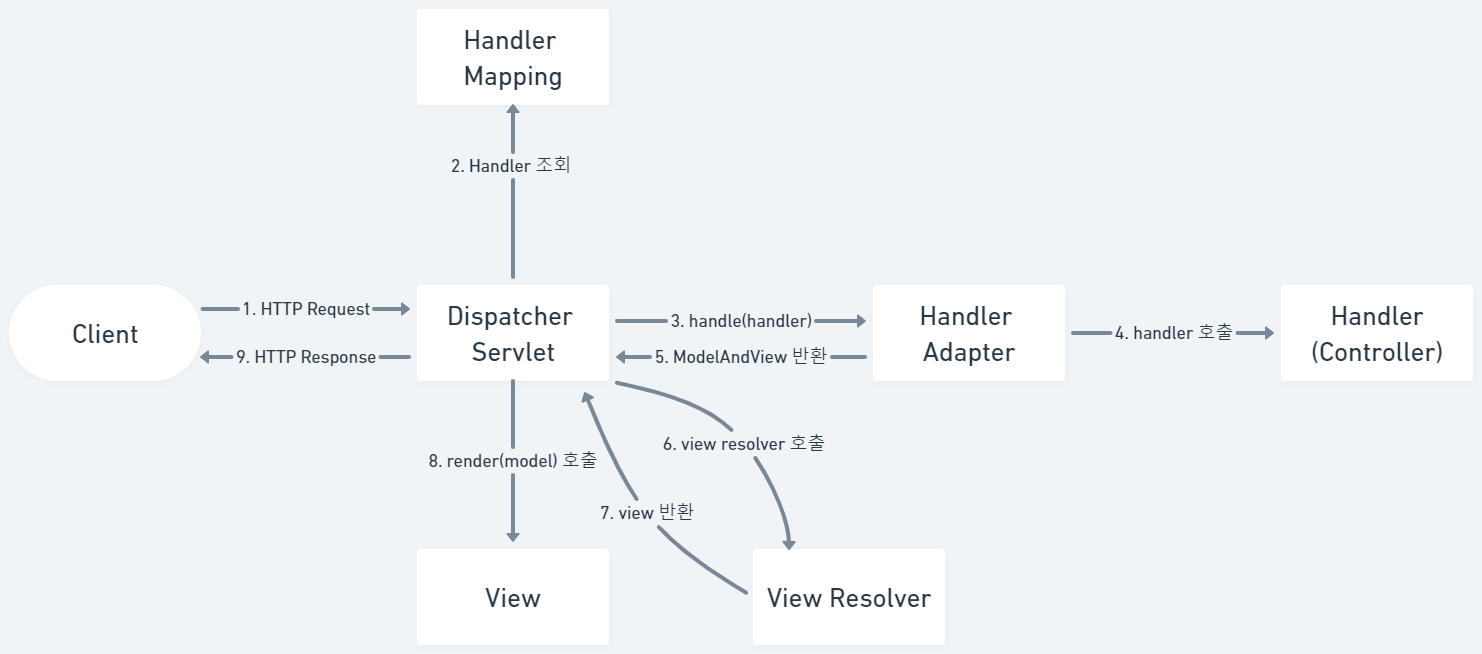
1. Spring MVC request life cycle

Spring 사진 1
Spring 사진 2


2. Interceptor 적용하기

Interceptor를 이용해서 handler의 수행 시간을 측정하는 테스트를 진행한다.

클라이언트 측에서 수행 시간을 확인하는 요청을 보낸다.


<button onclick="location.href='stopwatch'">수행 시간 확인하기</button>


컨트롤러의 핸들러 메소드에서 무언가 수행하는 상황을 상정하기 위해 Thread.sleep(밀리세컨)를 사용하여 잠시 멈추었다가 진행되도록 한다.


@GetMapping("stopwatch")
public String handlerMethod() throws InterruptedException {
		
	System.out.println("핸들러 메소드 호출함...");
	/* 아무 것도 하는 일이 없으니 수행시간이 0으로 나올 수 있어서 Thread.sleep(1000) 호출 */
	Thread.sleep(1000);
		
	return "result";
}


핸들러로 가는 요청을 가로챌 Interceptor를 작성한다. Interceptor는HandlerInterceptor 인터페이스를 구현하여 개발할 수 있으며, preHandle()postHandle()afterCompletion() 등의 메소드를 오버라이드하여 사용한다. preHandle() 메소드는 컨트롤러 실행 전, postHandle() 메소드는 컨트롤러 실행 후, afterCompletion() 메소드는 뷰가 렌더링 된 후 호출된다.


@Component
public class StopWatchInterceptor implements HandlerInterceptor {
	
	private final MenuService menuService;

	/* 인터셉터는 스프링 컨테이너에 존재하는 빈을 의존성 주입 받을 수 있다. */
	public StopWatchInterceptor(MenuService menuService) {
		this.menuService = menuService;
	}
	
	/* 전처리 메소드로 메소드 실행 시작 시간을 request에 attribute로 저장한다. */
	@Override
	public boolean preHandle(HttpServletRequest request, HttpServletResponse response, 
			Object handler) throws Exception {
		
		System.out.println("preHandler 호출함...");
		
		long startTime = System.currentTimeMillis();
		
		request.setAttribute("startTime", startTime);
		
		/* true이면 컨트롤러를 이어서 호출한다. false이면 핸들러 메소드를 호출하지 않는다. */
		return true;
	}
	
	/* 후처리 메소드로 메소드 실행 종료 시간을 구해 실행 시작 시간과 연산하여 걸린 시간을 계산한다. */
	@Override
	public void postHandle(HttpServletRequest request, HttpServletResponse response, 
			Object handler, @Nullable ModelAndView modelAndView) throws Exception {
		
		System.out.println("postHandler 호출함...");
		
		long startTime = (Long) request.getAttribute("startTime");
		request.removeAttribute("startTime");
		
		long endTime = System.currentTimeMillis();
		
		modelAndView.addObject("interval", endTime - startTime);
	}
	
	/* 뷰가 렌더링 된 후 호출하는 메소드 */
	public void afterCompletion(HttpServletRequest request, HttpServletResponse response, 
			Object handler, @Nullable Exception ex) throws Exception {
		
		System.out.println("afterComplate 호출함...");
		
		menuService.method();
	}
	
}


MenuService는 의존성 주입 테스트를 위해 작성하는 클래스이다.


@Service
public class MenuService {
	
	public void method() {
		System.out.println("메소드 호출 확인");
	}
	
}


응답할 뷰는 아래와 같이 작성하여 메소드 호출 수행시간을 출력해본다.


<!doctype html>
<html lang="en">
<head>
    <meta charset="UTF-8">
    <title>result</title>
</head>
<body>
    <h1 th:text="|메소드 호출 수행 시간 : ${ interval } (ms)|"></h1>
</body>
</html>


Interceptor를 사용하려면, WebMvcConfigurer 인터페이스를 구현하는 설정 클래스를 만들고 addInterceptors() 메소드를 오버라이드하여 등록해야 한다. 이 때 등록 순서에 따라 Interceptor가 실행되는 순서가 결정된다.


@Configuration
public class WebConfiguration implements WebMvcConfigurer {

		@Autowired
    private StopWatchInterceptor stopWatchInterceptor;

    @Override
    public void addInterceptors(InterceptorRegistry registry) {

        registry.addInterceptor(stopWatchInterceptor)
                .addPathPatterns("/stopwatch");
    }
}


로그와 결과 화면을 통해 Interceptor가 잘 적용 되었음을 확인할 수 있다.


만약 모든 요청에 대해서 인터셉터를 적용하고 싶다면 아래와 같이 적용할 수 있다. 정적 리소스 또는 에러 포워딩 경로 등은 excluedPathPatterns 메서드를 통해 제외해주면 된다.


@Configuration
public class WebConfiguration implements WebMvcConfigurer {

		@Autowired
    private StopWatchInterceptor stopWatchInterceptor;

    @Override
    public void addInterceptors(InterceptorRegistry registry) {

        registry.addInterceptor(stopWatchInterceptor)
                .addPathPatterns("/*")
                /* static 하위의 정적 리소스는 인터셉터가 적용되지 않도록 한다. */
                .excludePathPatterns("/css/**")
                .excludePathPatterns("/images/**")
                .excludePathPatterns("/js/**")
                /* /error 로 포워딩 되는 경로도 제외해주어야 한다. */
                .excludePathPatterns("/error");
    }
}
728x90
반응형
728x90
반응형

[Spring Boot] Spring Boot 에러 처리: @ExceptionHandler로 쉽게 관리하기


[Spring Boot] Spring Boot 에러 처리: @ExceptionHandler로 쉽게 관리하기

[Spring Boot] Spring Boot Controller에서 ModelAndView 반환과 동작 원리 [Spring Boot] Spring Boot Controller에서 ModelAndView 반환과 동작 원리[Spring Boot] Spring Boot View Resolver에서 String 반환의 의미와 동작 원리 [Spring Bo

crushed-taro.tistory.com

1.Exception Handler 테스트

1. @ControllerAdvice

@ControllerAdvice 어노테이션은 스프링에서 예외 처리를 담당하는 어노테이션이다. 
@ControllerAdvice 어노테이션이 붙은 클래스는 전역 예외 처리를 담당하게 된다. 즉, 여러 개의 컨트롤러에서 발생하는 예외를 일괄적으로 처리하기 위해 사용한다. 이 어노테이션을 사용하면 모든 컨트롤러에서 발생하는 예외를 한 곳에서 처리할 수 있어 코드의 중복을 방지할 수 있다.


=> @ControllerAdvice 어노테이션을 사용하면 전역 예외 처리를 할 수 있다는 장점이 있지만, 이 어노테이션을 사용하면서 주의해야 할 점도 있다. @ControllerAdvice 어노테이션이 붙은 클래스는 컨트롤러에서 발생하는 모든 예외를 처리하게 되므로, 예외 처리에 대한 로직이 많아지면 클래스의 크기가 커질 수 있다. 따라서 이를 방지하기 위해서는 역할에 따라 클래스를 나눠야 한다.


1. 기본 에러 화면


클라이언트에서 다음과 같은 버튼 클릭 이벤트를 통해 요청한다.


<button onclick="location.href='other-controller-null'">
	NullPointerException 테스트
</button>
<button onclick="location.href='other-controller-user'">
	사용자 정의 Exception 테스트
</button>


새로운 Controller 클래스를 만들어 위의 요청과 연결하고 다시 한 번 컨트롤러의 핸들러 메소드에 의도적으로 NullPointerException

과, 사용자 정의 Exception인 MemberRegistException을 발생시키는 코드를 작성한다.


@GetMapping("other-controller-null")
public String otherNullPointerExceptionTest() {
		
	String str = null;
	System.out.println(str.charAt(0));
		
	return "/";
}
@GetMapping("other-controller-user")
public String otherUserExceptionTest() throws MemberRegistException {
		
	boolean check = true;
	if(check) {
		throw new MemberRegistException("당신 같은 사람은 회원으로 받을 수 없습니다!");
	}
		
	return "/";
}


이전의 Controller 클래스에 작성 했던 @ExceptionHandler 어노테이션이 붙은 메소드는 동작하지 않는다. 따라서 기본 에러 응답 화면을 확인할 수 있다.


2. Global 레벨의 Exception 처리


별도의 클래스에 @ControllerAdvice 어노테이션을 붙이고 @ExceptionHandler 노테이션을 붙인 메소드를 정의한다.


@ExceptionHandler(NullPointerException.class)
public String nullPointerExceptionHandler(NullPointerException exception) {

	System.out.println("Global 레벨의 exception 처리");

	return "error/nullPointer";
}
@ExceptionHandler(MemberRegistException.class)
public String userExceptionHandler(Model model, MemberRegistException exception) {

	System.out.println("Global 레벨의 exception 처리");
	model.addAttribute("exception", exception);

	return "error/memberRegist";
}


Controller 클래스 내에 Exception Handler 설정이 없을 때@ControllerAdvice 클래스에서 전역으로 설정 된 Exception Handler가 동작한다는 것을 확인할 수 있다.


3. 상위 타입으로 default 처리


클라이언트에서 다음과 같은 버튼 클릭 이벤트를 통해 요청한다.


<button onclick="location.href='other-controller-array'">ArrayException 테스트</button>


컨트롤러의 핸들러 메소드에 의도적으로 ArrayIndexOutOfBoundsException을 발생시키는 코드를 작성한다.


@GetMapping("other-controller-array")
public String otherArrayExceptionTest() {

    double[] array = new double[0];
    System.out.println(array[0]);

    return "/";
}


그리@ControllerAdvice가 선언된 클래스에 Exception 타입을 트랩하는 Exception Handler method를 작성한다.


@ExceptionHandler(Exception.class)
public String defaultExceptionHandler(Exception exception) {

    return "error/default";
}


에러 뷰는 다음과 같이 작성한다.


<!DOCTYPE html>
<html lang="en">
<head>
    <meta charset="UTF-8">
    <title>default</title>
</head>
<body>
    <h1>뭔가 에러가 발생함</h1>
</body>
</html>


상위 타입인 Exception을 이용하면 구체적으로 작성하지 않은 타입의 에러가 발생하더라도 처리가 가능하므로 default 처리 용도로 사용할 수 있다.


3. ResponseStatusExceptionResolver

ResponseStatusExceptionResolver는 @ExceptionHandler 어노테이션과 함께 사용할 수 있다. 구체적인 응답 코드를 지정할 수 있어 404나 500과 같은 HTTP 상태 코드를 반환할 수 있다. 


다음은 ResponseStatusExceptionResolver 사용 예시 코드이다.


@ResponseStatus(value = HttpStatus.FORBIDDEN, reason = "Permission Denied")
@ExceptionHandler(value=DeniedUserException.class)
public String handleDeniedUserException(DeniedUserException e) {
    
    return "/error/403";
}


4. SimpleMappingExceptionResolver

SimpleMappingExceptionResolver는 예외 타입별로 예외 처리 페이지를 매핑해주는 방식을 제공한다. 


예외 타입과 예외 처리 페이지를 매핑하기 위해서는 setExceptionMappings 메소드를 사용한다. 이 메소드는 Properties 타입의 객체를 인자로 받는다. Properties 객체의 키는 예외 타입, 값은 예외 처리 페이지의 뷰 이름이다.

또한, defaultErrorView 프로퍼티를 이용해 예외 처리 페이지가 명시되어 있지 않은 예외에 대한 기본 처리 페이지를 설정할 수 있다.

다음은 SimpleMappingExceptionResolver 사용 예시 코드이다.


@Configuration
public class RootConfiguration {

    @Bean
    public SimpleMappingExceptionResolver simpleMappingExceptionResolver() {

        SimpleMappingExceptionResolver exceptionResolver = new SimpleMappingExceptionResolver();

        Properties props = new Properties();
        props.setProperty("java.lang.NullPointerException", "error/nullPointer");
        props.setProperty("MemberRegistException", "error/memberRegist");

        exceptionResolver.setExceptionMappings(props);
        exceptionResolver.setDefaultErrorView("error/default");

        return exceptionResolver;
    }
}
728x90
반응형
728x90
반응형

[Spring Boot] Spring Boot Controller에서 ModelAndView 반환과 동작 원리


[Spring Boot] Spring Boot Controller에서 ModelAndView 반환과 동작 원리

[Spring Boot] Spring Boot View Resolver에서 String 반환의 의미와 동작 원리 [Spring Boot] Spring Boot View Resolver에서 String 반환의 의미와 동작 원리[Spring Boot] Spring Boot @RequestBody 완벽 가이드: Handler Method에서 JSON

crushed-taro.tistory.com

1. Exception Handler

Exception Handler란, 프로그램이 실행 중에 예기치 않은 오류가 발생했을 때 이를 처리하는 메커니즘이다. 스프링 MVC에서는 예외 처리를 관리하는 기능을 여러가지 제공하고 있다. 


1. Handler Exceptino Resolver

HandlerExceptionResolver는 스프링에서 예외를 처리하는 방법 중 하나이다. DispatcherServlet이 예외가 발생했을 때, HandlerExceptionResolver를 이용해 예외를 처리할 수 있다.


종류

  • SimpleMappingExceptionResolver
  • DefaultHandlerExceptionResolver
  • ResponseStatusExceptionResolver
  • ExceptionHandlerExceptionResolver


방식

  • SimpleMappingExceptionResolver
    • 예외 타입별로 예외 처리 페이지를 매핑해준다.
  • DefaultHandlerExceptionResolver
    • 기본 예외 처리 방식을 제공한다.
  • ResponseStatusExceptionResolver
    • 예외 발생 시 HTTP 상태 코드를 반환한다.
  • ExceptionHandlerExceptionResolver
    • @ExceptionHandler 어노테이션을 이용해서 컨트롤러 내부에서 예외를 처리할 수 있다.


2. Exception Handler 테스트

1. @ExceptionHandler

@ExceptionHandler
는 스프링 MVC에서 예외 처리를 담당하는 어노테이션으로, Controller 클래스 내에서 예외가 발생했을 때 해당 예외를 처리할 메서드를 정의하는 데 사용된다.


1. 기본 에러 화면


클라이언트에서 다음과 같은 버튼 클릭 이벤트를 통해 요청한다.

<button onclick="location.href='controller-null'">NullPointerException 테스트</button>
<button onclick="location.href='controller-user'">사용자 정의 Exception 테스트</button>


컨트롤러의 핸들러 메소드에 의도적으로 NullPointerException과, 사용자 정의 Exception인 MemberRegistException을 발생시키는 코드를 작성한다.

@GetMapping("controller-null")
public String nullPointerExceptionTest() {
		
	String str = null;
	System.out.println(str.charAt(0));
		
	return "/";
}
@GetMapping("controller-user")
public String userExceptionTest() throws MemberRegistException {
		
	boolean check = true;
	if(check) {
		throw new MemberRegistException("당신 같은 사람은 회원으로 받을 수 없습니다!");
	}
		
	return "/";
}


Exception Handling이 되어 있지 않아 기본 화면으로 오류 화면이 응답된다.


2. Controller 레벨의 Exception 처리


동일 클래스에 아래와 같은 @ExceptionHandler노테이션이 붙은 메소드를 정의하고 응답할 뷰도 작성한다.

@ExceptionHandler(NullPointerException.class)
public String nullPointerExceptionHandler(NullPointerException exception) {

	System.out.println("controller 레벨의 exception 처리");

	return "error/nullPointer";
}
<!doctype html>
<html lang="en">
<head>
    <meta charset="UTF-8">
    <title>nullPointer</title>
</head>
<body>
    <h1>널 위하여 NullPointerException 발생함!</h1>
</body>
</html>
@ExceptionHandler(MemberRegistException.class)
public String userExceptionHandler(Model model, MemberRegistException exception) {

	System.out.println("controller 레벨의 exception 처리");
	model.addAttribute("exception", exception);

	return "error/memberRegist";
}
<!DOCTYPE html>
<html lang="en">
<head>
    <meta charset="UTF-8">
    <title>memberRegist</title>
</head>
<body>
    <h1 th:text="${ exception.message }"></h1>
</body>
</html>


해당 Controller 범위에서 해당하는 Exception이 발생했을 때 그 Exception이 설정 된 메소드가 실행 된다.

이처럼 @ExceptionHandler 어노테이션을 통해 Controller의 메소드에서 throw된 Exception에 대한 공통적인 처리를 할 수 있도록 지원하고 있다.

728x90
반응형
728x90
반응형

[Spring Boot] Spring Boot View Resolver에서 String 반환의 의미와 동작 원리


[Spring Boot] Spring Boot View Resolver에서 String 반환의 의미와 동작 원리

[Spring Boot] Spring Boot @RequestBody 완벽 가이드: Handler Method에서 JSON 요청 처리하기 [Spring Boot] Spring Boot @RequestBody 완벽 가이드: Handler Method에서 JSON 요청 처리하기[Spring Boot] Spring Boot HttpSession 사용법 총

crushed-taro.tistory.com

1. View Resolver

1. ModelAndView 타입으로 반환

ModelAndView 타입으로 반환하는 경우, 모델과 뷰 정보를 한 번에 담아서 반환하게 된다. String과 ModelAndView는 모두 forward와 redirect를 사용할 수 있다. ModelAndView를 사용한 redirect 시 RedirectAttributes사용도 동일하게 가능하다.
 

1. view name 반환(forward)


GET 방식의 /modelandview요청을 전달한다.

<h3>ModelAndView로 뷰 이름 지정해서 반환하기</h3>
<button onclick="location.href='modelandview'">ModelAndView로 뷰 이름 지정해서 반환받기</button>


발생하는 요청을 매핑할 controller의 handler method이다.


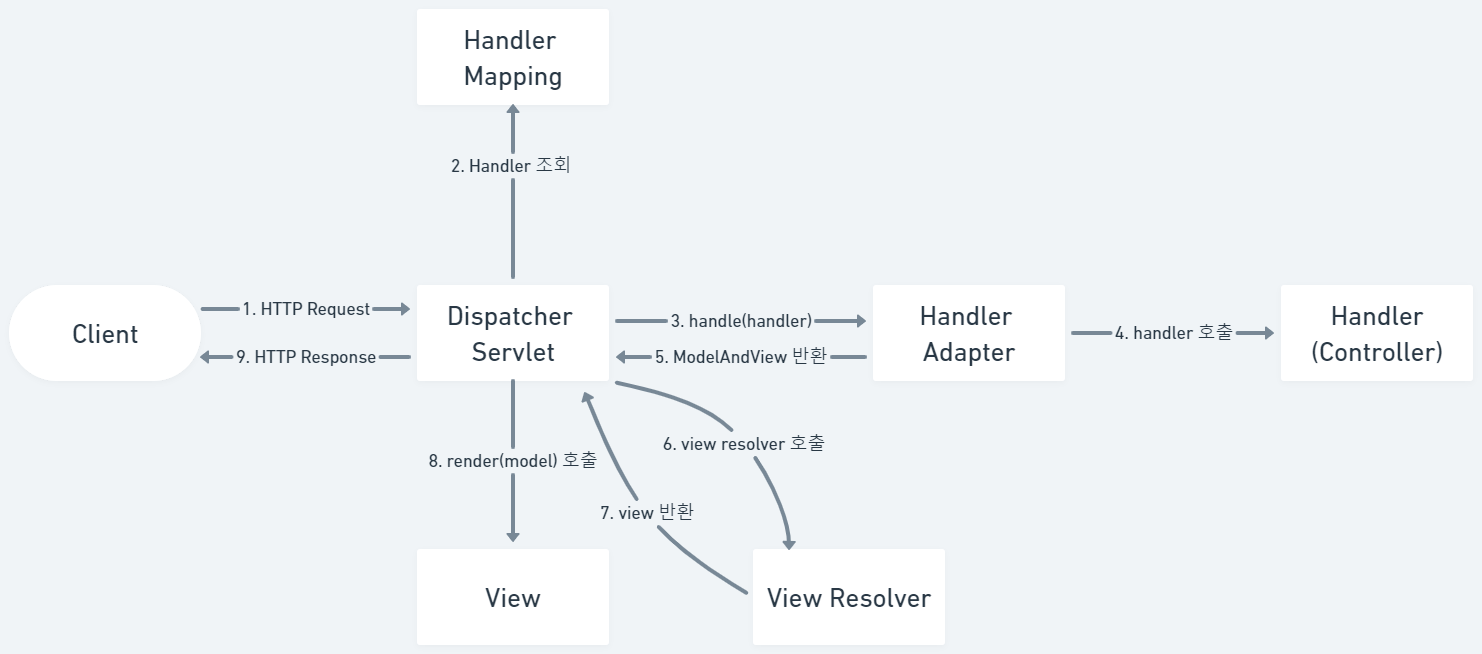
ModelAndView 타입은 모델과 뷰를 합친 개념이다. 핸들러 어댑터가 핸들러 메소드를 호출하고 반환받은 문자열을 ModelAndView로 만들어 dispatcherServlet에 반환한다. 이 때 문자열을 반환해도 되지만 ModelAndView를 미리 만들어서 반환할 수 도 있다.

@GetMapping("modelandview")
public ModelAndView modelAndViewReturning(ModelAndView mv) {

	mv.addObject("forwardMessage", "ModelAndView를 이용한 모델과 뷰 반환");
	mv.setViewName("result");
		
	return mv;
}


응답할 뷰에서는 model에 추가 된 forwardMessage를 화면에 출력하도록 한다


view resolver가 올바르게 동작하였음을 응답 화면을 통해 확인할 수 있다.


2. redirect


GET 방식의 /modelandview-redirect요청을 전달한다.
<h3>ModelAndView로 redirect 하기</h3>
<button onclick="location.href='modelandview-redirect'">ModelAndView로 뷰 이름 반환하여 리다이렉트</button>


발생하는 요청을 매핑할 controller의 handler method이다. ModelAndView 객체에서도 동일하게 접두사로 redirect:를 붙이면 forward 되지 않고 redirect 된다.

@GetMapping("modelandview-redirect")
public ModelAndView modelAndViewRedirect(ModelAndView mv)  {
		
	mv.setViewName("redirect:/");
		
	return mv;
}


버튼 클릭 시 / 경로로 리다이렉트 되는 것을 확인할 수 있다.


3. RedirectAttributes


GET 방식의 /modelandview-redirect-attr 요청을 전달한다.

<h3>ModelAndView로 뷰 이름 반환하면서 flashAttribute 추가 하기</h3>
<button onclick="location.href='modelandview-redirect-attr'">
	ModelAndView로 뷰 이름 반환하여 리다이렉트
</button>


발생하는 요청을 매핑할 controller의 handler method이다.


ModelAndView 사용시에도 동일하게 RedirectAttributes 타입을 통해 redirect 시 속성 값을 저장할 수 있다.

@GetMapping("modelandview-redirect-attr")
public ModelAndView modelAndViewRedirect(ModelAndView mv, RedirectAttributes rttr) {
		
	rttr.addFlashAttribute("flashMessage2", "ModelAndview를 이용한 redirect attr");
	mv.setViewName("redirect:/");
		
	return mv;
}


응답 시 requestScope에 보존flashMessage2을 꺼내 alert 창에 띄운다.

<script>
    const flashMessage2 = '[[${ flashMessage2 }]]';
    console.log(flashMessage2);
    if(flashMessage2) {
       alert(flashMessage2);
    }
</script>


redirect 했지만 메세지가 잘 보존 되었음을 alert 창의 메세지를 통해 확인할 수 있다.

728x90
반응형
728x90
반응형

[Spring Boot] Spring Boot @RequestBody 완벽 가이드: Handler Method에서 JSON 요청 처리하기


[Spring Boot] Spring Boot @RequestBody 완벽 가이드: Handler Method에서 JSON 요청 처리하기

[Spring Boot] Spring Boot HttpSession 사용법 총정리 - Handler Method에서 세션 데이터 관리하기 [Spring Boot] Spring Boot HttpSession 사용법 총정리 - Handler Method에서 세션 데이터 관리하기[Spring Boot] Spring Boot @ModelAtt

crushed-taro.tistory.com

1. View Resolver

View Resolver 사진 1


핸들러 메소드가 요청을 처리하고 논리 뷰 이름을 반환하면 DispatcherServlet은 화면에서 데이터를 표시하도록 뷰 템플릿에 제어권을 넘긴다. 스프링 MVC에서는 다양한 전략에 맞게 뷰를 해석할 수 있는 ViewResolver 구현체 몇 가지가 있다.


그 중 MVC 기본 설정에는 템플릿 명과 위치에 따른 뷰를 해석하는 InternalResourceViewResolver를 기본으로 사용하고 있다.


prefix/suffix를 이용해 뷰 이름을 특정 애플리케이션 디렉터리에 대응시킨다. InternalResourceViewResolver는 사용이 간단해서 좋기는 하지만 RequestDispatcher가 forward할 수 있는 내부 리소스(jsp또는 서블릿)만 해석이 가능하기 때문에, 다른 뷰 템플릿을 사용하는 경우에는 다른 viewResolver를 사용해야 한다.


타임리프 또한 동일한 방식의 뷰 리졸버인 ThymeleafViewResolver를 사용한다. 다만 prefix가 resources/templates/ 이고 suffix가 .html 이다.


1. String 타입으로 반환

1. view name 반환(forward)


GET 방식의 /string요청을 전달한다.

<h3>문자열로 뷰 이름 반환하기</h3>
<button onclick="location.href='string'">문자열로 뷰 이름 반환</button>


발생하는 요청을 매핑할 controller의 handler method이다. 

@GetMapping("string")
public String stringReturning(Model model) {
		
	model.addAttribute("forwardMessage", "문자열로 뷰 이름 반환함...");
	
	return "result";
}


문자열로 뷰 이름을 반환한다는 것은 반환 후 ThymeleafViewResolver에게  resources/templates/  prefix로 .html  suffix로 하여 resources/templates/result.html 파일을 응답 뷰로 설정하라는 의미가 된다.


응답할 뷰에서는 model에 추가 된 forwardMessage를 화면에 출력하도록 한다.

<!doctype html>
<html lang="en">
<head>
    <meta charset="UTF-8">
    <title>result</title>
</head>
<body>
    <h1 th:text="${ forwardMessage }"></h1>
</body>
</html>


view resolver가 올바르게 동작하였음을 응답 화면을 통해 확인할 수 있다.


2. redirect


GET 방식의 /string-redirect 요청을 전달한다.

<h3>문자열로 redirect 하기</h3>
<button onclick="location.href='string-redirect'">문자열로 뷰 이름 반환하여 리다이렉트</button>


발생하는 요청을 매핑할 controller의 handler method이다. 동일하게 String 반환 값을 사용하지만 접두사로 redirect:를 붙이면 forward 되지 않고 redirect 된다.

@GetMapping("string-redirect")
public String stringRedirect()  {
		
	return "redirect:/";
}


버튼 클릭 시 / 경로로 리다이렉트 되는 것을 확인할 수 있다.


3. RedirectAttributes


GET 방식의 /string-redirect-attr 청을 전달한다.

<h3>문자열로 뷰 이름 반환하면서 flashAttribute 추가 하기</h3>
<button onclick="location.href='string-redirect-attr'">
	문자열로 뷰 이름 반환하여 리다이렉트 & flashAttr 사용하기
</button>


발생하는 요청을 매핑할 controller의 handler method이다.


기본적으로 redirect시에는 재요청이 발생하므로 request scope는 소멸된다. 하지만 스프링에서는 RedirectAttributes 타입을 통해 redirect 시 속성 값을 저장할 수 있도록 하는 기능을 제공한다. 리다이렉트 시 flash 영역에 담아서 redirect 할 수 있다. 자동으로 모델에 추가되기 때문에 requestScope에서 값을 꺼내면 된다. 세션에 임시로 값을 담고 소멸하는 방식이기 때문에 session에 동일한 키 값이 존재하지 않아야 한다.


@GetMapping("string-redirect-attr")
public String stringRedirectFlashAttribute(RedirectAttributes rttr) {

		rttr.addFlashAttribute("flashMessage1", "리다이렉트 attr 사용하여 redirect..");
		
		return "redirect:/";
	}


응답 시 requestScope에 보존 된 flashMessage1을 꺼내 alert 창에 띄운다.

<script>
    const flashMessage1 = '[[${ flashMessage1 }]]';
    console.log(flashMessage1);
    if(flashMessage1) {
       alert(flashMessage1);
    }
</script>


redirect 했지만 메세지가 잘 보존 되었음을 alert 창의 메세지를 통해 확인할 수 있다.

728x90
반응형

+ Recent posts